
Platform Overview
The FeedB2B platform provides a centralized interface for viewing, monitoring, and managing events received from multiple data providers.
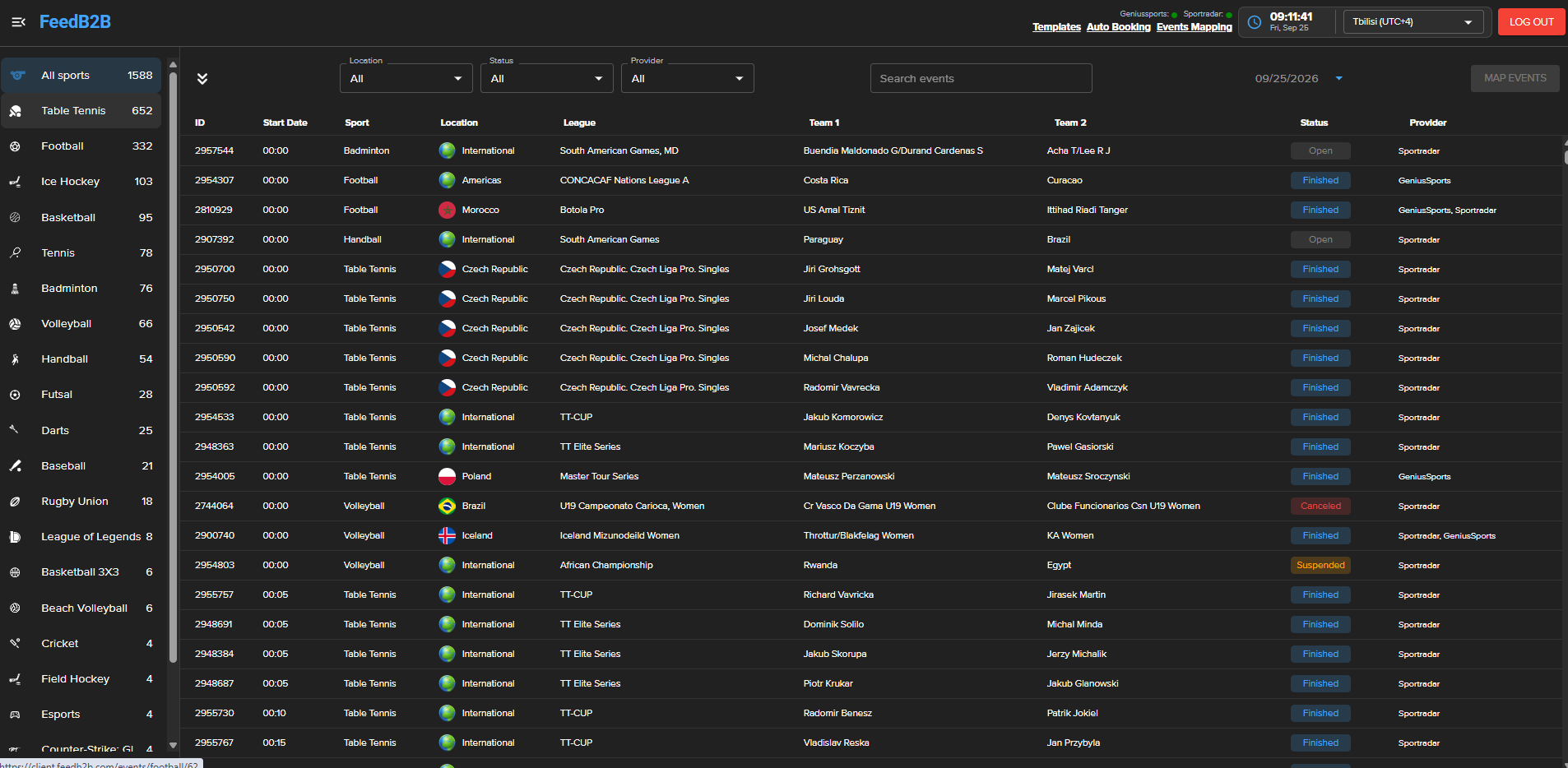
The main Events page displays all available events and provides tools for filtering, searching, monitoring provider availability, and accessing individual events.
Provider Status
At the top of the platform, the currently available providers are displayed together with their connection status.
- 🟢 Green — the provider is connected and operating normally.
- 🔴 Red — the provider is currently disconnected or unavailable.
This allows users to quickly monitor the availability of configured providers.
Timezone
The timezone selector in the upper-right corner controls how dates and times are displayed throughout the platform.
For example, selecting Yerevan (UTC+4) displays event start times according to that timezone.
Changing the timezone affects only how times are displayed and does not modify the original event data.
Sports
The left sidebar displays the sports for which events are currently available.
Each sport includes the number of available events. Selecting a sport filters the event list accordingly.
Event Filters
Additional filters are available above the event list:
Location — filters events by country, region, or international competition.
Status — filters events according to their current status, such as Open, Finished, Suspended, or Canceled.
Provider — displays only events available from a selected provider.
Date — allows users to view events for a specific date.
Filters can be combined to narrow the event list.
Search
The Search events field can be used to quickly locate a specific event.
Users can search for events using relevant event information such as participant or team names.
Event List
Each row represents an event available in FeedB2B.
The table provides key information including:
| Field | Description |
|---|---|
| ID | FeedB2B event ID |
| Start Date | Scheduled event start time in the selected timezone |
| Sport | Sport of the event |
| Location | Country, region, or competition location |
| League | League or competition |
| Team 1 | First participant |
| Team 2 | Second participant |
| Status | Current event status |
| Provider | Provider or providers supplying the event |
An event may be available from multiple providers. In this case, all providers associated with the event are shown in the Provider column.