
Templates
Margin Templates allow users to configure how margins are applied to odds and control which markets are available.
Margin Assignment Levels
Margins can be configured and assigned at three levels:
- Sport — applies the margin configuration across the selected sport.
- League — applies the configuration to a specific league.
- Event — applies the configuration to a specific event.
This allows users to define general margin settings at the sport level and apply more specific configurations to particular leagues or events when needed.
Within a template, margins can also be configured individually for each market, and specific markets can be enabled or disabled.
Template Assignment
A template can be assigned at different levels:
- Sport — applies to events within the selected sport.
- League — applies to events within a specific league.
- Event — applies to a specific event.
This allows general margin settings to be created while still providing more specific configuration where needed.
Creating a Template
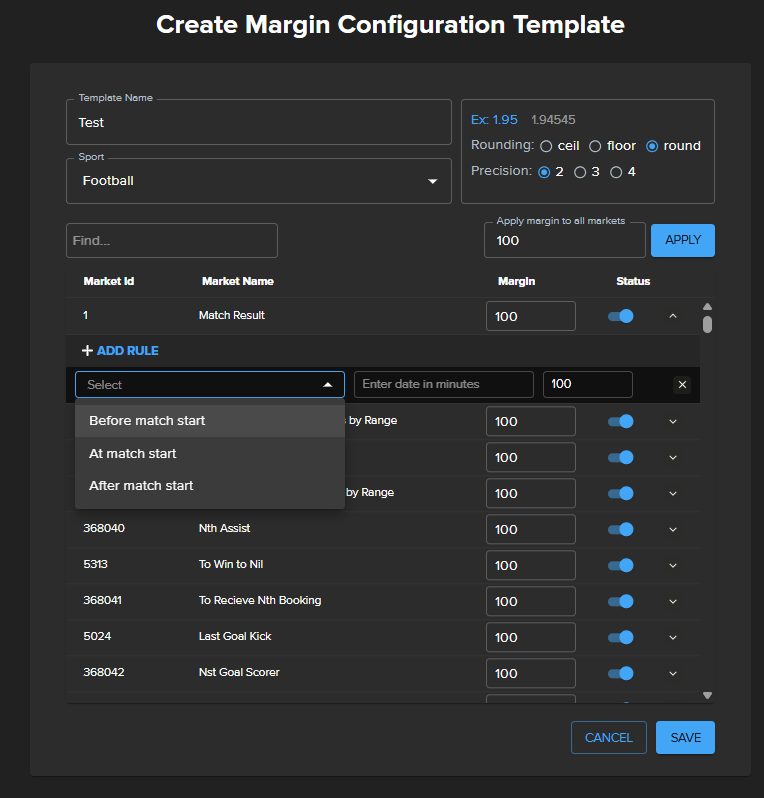
When creating a template, select the sport and configure:
- Template Name
- Rounding method — ceil, floor, or round
- Precision — number of decimal places used for the resulting odds
- Margin — the margin to apply to each market
- Market Status — enables or disables individual markets
The Apply margin to all markets option can be used to quickly set the same margin for all markets. Individual markets can then be adjusted separately.
Market Configuration
Each market can have its own margin and status.
For example, users can:
- Apply different margins to specific markets.
- Disable markets that should not be provided.
- Enable markets individually when required.
- Search for a specific market by name.
This makes it possible to use one template while maintaining market-specific configuration.
Time-Based Rules
Additional rules can be added to a market to change its margin depending on the event start time.
Available conditions include:
- Before match start
- At match start
- After match start
Each rule can define its own margin and time condition.
For example, a market can use one margin before the event starts and another after the event has started.
Managing Templates
Existing templates are available on the Templates page, where they can be edited or deleted.
The Assigned Templates section can be used to view and manage templates that have already been assigned.
This is probably enough for the GitBook page. I wouldn't explain the mathematical margin calculation here — that belongs in a separate Margin reference/concept section if you decide to document it later.